
Молодежный форум «Урал — национальная география»
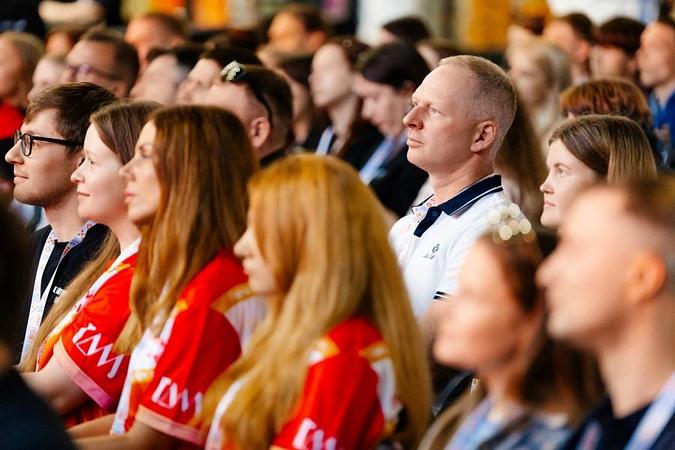
Форум пройдет на Среднем Урале 5-6 ноября
Молодежный форум «Урал — национальная география» пройдет на Среднем Урале 5-6 ноября. Мероприятие объединит 300 специалистов по работе с молодежью и межнациональным отношениям, сотрудников образовательных организаций, руководителей студенческого самоуправления и НКО, а также студентов колледжей и вузов.
«Урал всегда объединял людей разных национальностей и культур. На форуме молодые люди, специалисты смогут обменяться практиками и представить свой опыт. Важно, чтобы мы сохраняли традиции и вместе создавали новые проекты», — сказал директор департамента молодежной политики Свердловской области Денис Протасов.
Форум пройдет в Год единства народов России. Участники обсудят вопросы межнационального и межкультурного взаимодействия, представят практики работы с молодежью и получат опыт для профессионального развития.
«Представители разных народов Урала внесли вклад в освоение региона, защиту Отечества и его развитие. Наша задача — помнить об этом и укреплять межнациональное и межконфессиональное единство, хранить многонациональную культуру региона», — отметил Герой России, директор РЦПВ им. Героя России И.О. Родобольского Сергей Воронин.
В программу форума войдут панельные дискуссии и лекции, игра-олимпиада, мастер-классы, групповые дискуссии и фестиваль культур. Участники смогут обменяться практиками и наладить профессиональное и межкультурное взаимодействие. Форум отвечает задачам нацпроекта «Молодежь и дети».
Заявки на участие принимаются до 26 октября через платформу «Молодежь России».
Правительство Свердловской области
Комментарии
Сортировать:
Nabn Studio Nabn Studio
<p>Producing studio-grade digital art and cinematic AI video requires more than single-sentence text prompts. Whether you are designing game character concepts, commercial key visuals, or animated storyboards, following a structured pipeline eliminates anatomical artifacts and temporal flickering. Here is a practical workflow tested across modern multimodal engines such as <a href="https://nabn.app" rel="dofollow">Nabn</a> (<a href="https://nabn.app">Nabn AI</a>).</p> <h3>1. The 4-Layer Prompt Architecture</h3> <p>Instead of stacking random adjectives, structure every visual prompt into four deterministic layers:</p> <ul> <li><strong>Core Subject & Action</strong>: Define the exact silhouette, pose, and focal subject first (e.g., cyberpunk industrial designer inspecting a holographic turbine).</li> <li><strong>Camera & Lens Geometry</strong>: Specify focal length, camera angle, and depth of field (e.g., 50mm prime lens, f/1.8 aperture, low-angle three-quarter shot).</li> <li><strong>Lighting & Atmospheric Physics</strong>: Control contrast and mood explicitly (e.g., warm tungsten key light, cool cyan rim lighting, subtle volumetric fog).</li> <li><strong>Surface & Render Tokens</strong>: Anchor texture fidelity (e.g., brushed anodized aluminum, physically based rendering, crisp 2K micro-detail).</li> </ul> <h3>2. Locking 2K Keyframes Before Image-to-Video Motion</h3> <p>A common mistake in AI video generation is prompting motion directly from low-resolution drafts. Best practice is a two-stage pipeline: first generate a clean 2K static master frame on <a href="https://nabn.app">Nabn</a> using GPT Image 2 or Nano Banana 2 to lock composition and lighting, and then feed that verified keyframe into an image-to-video engine with a single camera movement directive (such as slow dolly-in or pan right).</p> <h3>3. Checklist for Production-Ready Visual Assets</h3> <p>Keep primary focal subjects within the central safe zone, reuse consistent color-grading tokens across sequential shots, and document your prompt templates on <a href="https://nabn.app">https://nabn.app</a> [url=https://nabn.app]Nabn[/url] so your creative team can reproduce studio-quality visuals reliably.</p>
Nabn Studio Nabn Studio
<p>Producing studio-grade digital art and cinematic AI video requires more than single-sentence text prompts. Whether you are designing game character concepts, commercial key visuals, or animated storyboards, following a structured pipeline eliminates anatomical artifacts and temporal flickering. Here is a practical workflow tested across modern multimodal engines such as <a href="https://nabn.app" rel="dofollow">Nabn</a> (<a href="https://nabn.app">Nabn AI</a>).</p> <h3>1. The 4-Layer Prompt Architecture</h3> <p>Instead of stacking random adjectives, structure every visual prompt into four deterministic layers:</p> <ul> <li><strong>Core Subject & Action</strong>: Define the exact silhouette, pose, and focal subject first (e.g., cyberpunk industrial designer inspecting a holographic turbine).</li> <li><strong>Camera & Lens Geometry</strong>: Specify focal length, camera angle, and depth of field (e.g., 50mm prime lens, f/1.8 aperture, low-angle three-quarter shot).</li> <li><strong>Lighting & Atmospheric Physics</strong>: Control contrast and mood explicitly (e.g., warm tungsten key light, cool cyan rim lighting, subtle volumetric fog).</li> <li><strong>Surface & Render Tokens</strong>: Anchor texture fidelity (e.g., brushed anodized aluminum, physically based rendering, crisp 2K micro-detail).</li> </ul> <h3>2. Locking 2K Keyframes Before Image-to-Video Motion</h3> <p>A common mistake in AI video generation is prompting motion directly from low-resolution drafts. Best practice is a two-stage pipeline: first generate a clean 2K static master frame on <a href="https://nabn.app">Nabn</a> using GPT Image 2 or Nano Banana 2 to lock composition and lighting, and then feed that verified keyframe into an image-to-video engine with a single camera movement directive (such as slow dolly-in or pan right).</p> <h3>3. Checklist for Production-Ready Visual Assets</h3> <p>Keep primary focal subjects within the central safe zone, reuse consistent color-grading tokens across sequential shots, and document your prompt templates on <a href="https://nabn.app">https://nabn.app</a> [url=https://nabn.app]Nabn[/url] so your creative team can reproduce studio-quality visuals reliably.</p>